
Give Your Affiliates Everything They Need to Promote You, With Their Own Link Already In It
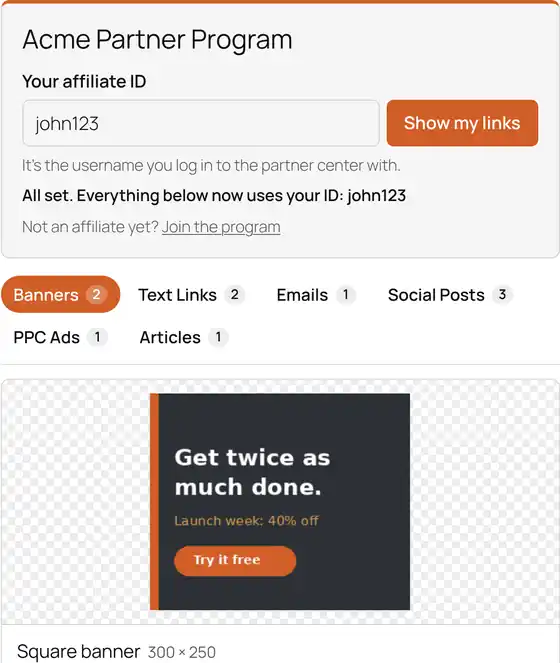
Your Affiliate Tools, Ready to Copy and Paste
Your affiliates type their ID once. Every banner, email, social post and link on the page instantly fills in with their affiliate link, ready to copy and paste.
No logins. No digging through folders. No "where does my ID go?" emails.
- Works with any affiliate program that puts an ID in the link.
- Lives on your own WordPress site, in your own theme.
- Set up in minutes. No coding.
Sound Familiar?
You set up an affiliate program. You made banners, wrote promo emails, maybe a few social posts. Then you sent your affiliates a link to a shared folder, a PDF, or a login screen inside your shopping cart... and waited for sales.
Most affiliates never dig those tools out. They're buried behind a login or scattered across files, and your affiliates still have to work out where their own affiliate link goes.
WP Affiliate Tool Box fixes that. It puts every affiliate resource you have on one page of your own website. An affiliate types their ID, clicks one button, and everything on the page updates with their personal link. They copy, paste and start promoting you, using your best copy and your best banners.
— Frank Deardurff III, That One Web Guy
What's New in Version 3
Rebuilt From the Ground Up
Version 3 is a complete rewrite for today's WordPress. You manage everything right in your dashboard under Affiliate Tools: pick the kind of tool, fill in the content, publish.
Wherever the affiliate's link belongs, type {affiliate_link}. That's the whole trick.
The tool page uses your theme's fonts and colors, so it looks like part of your site on desktop and phone, light theme or dark.
Smart Tabs
The tool page only shows tabs for the kinds of tools you've actually added, each with a count. If you only have banners and emails, that's all your affiliates see. No empty sections, no dead ends.
The tabs work with a keyboard and screen readers too.
Six Tool Types, Built In
Banners, text links, emails, social posts, PPC ads and articles. Write each one once with {affiliate_link} where the link goes, and every affiliate gets their own version.
Each tool can also point to its own landing page (your pricing page, a launch page) and carry a short tip for affiliates, like "Best for your welcome sequence."
Type the ID Once. Copy Anything.
Every banner code, link, subject line and email has its own one-click Copy button.
The page remembers each affiliate's ID in their browser, so next time their links are already waiting. You can even send affiliates straight to their own tools from your emails or affiliate dashboard with a link like yoursite.com/affiliate-tools/?affid=john123.
Works With Your Affiliate Program, Not Instead of It
If your shopping cart or affiliate platform puts the affiliate's ID in the link, it works with WP Affiliate Tool Box. Copy one working affiliate link, replace the ID with {affiliate_id}, and you're done:
https://yoursite.com/?ref={affiliate_id}https://yoursite.com/go/{affiliate_id}https://{affiliate_id}.vendor.hop.clickbank.net
Running more than one product or launch? Put tools into groups and give each one its own tool page.
Make It Easy, and Affiliates Promote More
Your affiliates are busy, and they promote whoever makes it easiest. When everything they need is on one clean page with their link already filled in, they spend their time promoting you instead of hunting for files.
And because they're copying your emails and your banners, your offer gets presented the way you wrote it, not however an affiliate threw it together at midnight.
Frequently Asked Questions
Q. Will this work with my shopping cart or affiliate platform?
A. If it puts the affiliate's ID in the affiliate link, yes. That covers PayBlue, ClickBank and most carts and affiliate platforms.
Q. Does it replace my affiliate program?
A. No. Your affiliate program keeps tracking clicks and paying commissions. WP Affiliate Tool Box is where your affiliates get their promo tools, on your own website with your branding.
Q. Do my affiliates need to log in?
A. No. They type their affiliate ID and go.
Q. Can I have tool pages for different products?
A. Yes. Put tools into groups and give each product or launch its own page.
Q. What's the difference between the licenses?
A. Only where you can use it. Every license gets the same plugin, every feature and automatic updates. Single Site covers one site you own, Multi Site covers unlimited sites you own, and Developer also covers your clients' sites.
Q. What if I move to a new website?
A. Deactivate your license on the old site from the plugin's settings, then activate it on the new one. No support ticket needed.
Automatic Updates, Right Inside WordPress
Activate your license key and new versions show up on your Plugins screen just like any other plugin. One click and you're current.
Your license is managed from the plugin's settings page: activate it, check its status, or move it to a new site whenever you need to.
It Pays for Itself Fast
Here's a simple example. Say you sell a $97 product and your affiliates bring in 20 sales a month. If an easier tool page helps them send just two more sales a month, that's an extra $194 every month, which covers a Single Site license several times over in the first month.
Your numbers will be different, but the math usually isn't close.
WP Affiliate Tool Box Will...
- Work with any affiliate program that puts an ID in the link.
- Put all your affiliate resources in one organized place.
- Get new affiliates promoting faster.
- Replace a hard-to-find or non-existent affiliate center.
- Fill in every banner, email and link with each affiliate's own ID.
- Impress new and existing affiliates with how easy it is.
- Give each product or launch its own tool page.
- Keep affiliates on your website instead of a third-party dashboard.
Get Your Copy Below
Get WP Affiliate Tool Box
One plugin, three licenses. Every license includes every feature and automatic updates. The only difference is where you can use it.
Single Site License
- Use on ONE site you own
- Every feature included
- Automatic updates
Multi Site License
- UNLIMITED sites you own
- Every feature included
- Automatic updates
- Best value
Developer License
- UNLIMITED sites you own plus your clients' sites
- Every feature included
- Automatic updates
